UBUYONE%C2%AE
(4 Units) Presentation Clicker with 4 Cases Wireless Presenter Remote PowerPoint Pointer Slide Advancer for Mac Laptop PC Computer Keynote
Couldn't load pickup availability
Overview
- Brand : UBUYONE
- Special Feature : Ergonomic
- Color : Black
- Max Number of Supported Devices : 4
- Compatible Devices : Computer
About this item
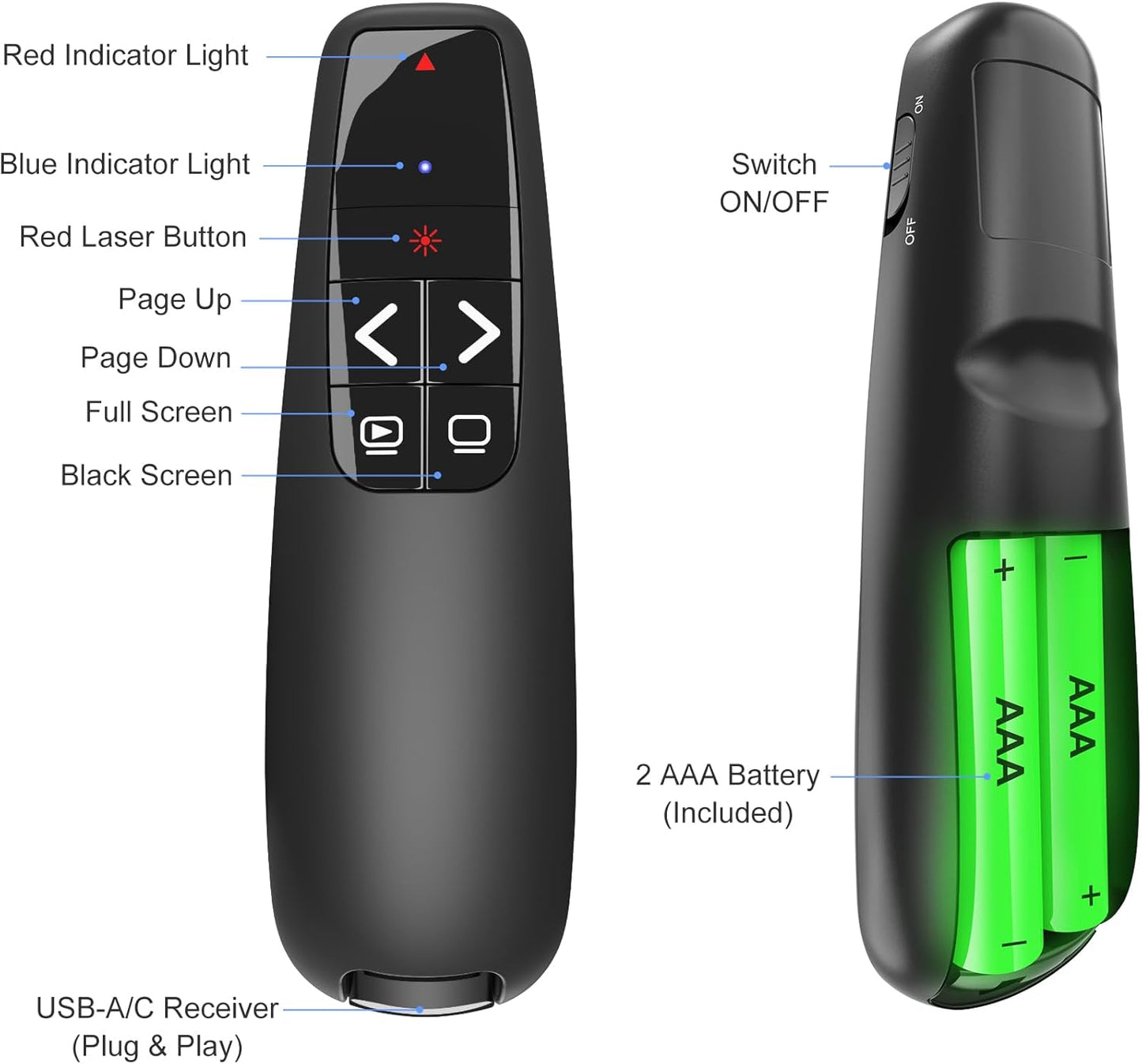
- [Presentation Clicker & Laser Pointer]This is a presentation remote with a very bright red laser pointer. You can change your PPT/ Google slide from anywhere in the room, while pointing the specific parts of the slide by laser. PowerPoint clicker controls range:98FT/30M, laser pointer range: 328FT/100M.
- [Amazing Ergonomically] PPT remote control has a amazing ergonomic design makes you soft touch and comfortable to grip.The USB dongle fits into the end of the remote rather than needing to open the battery compartment so a little less fumbling around.
- [USB A & USB C 2 in 1 Receiver, Plug and Play] No installation needed, no assembly or hard instructions to follow. Just plug and play. You simply plug the USB receiver into your computer and start using the laser pointer for presentations. Slide clicker receiver is not only fit for devices with USB A interface, but also for devices with Type-C interface.
- [Widely Compatible] Wireless presenter remote with laser pointer works with desktop and laptop computers. Presentation pointer supports systems: Windows 2003, XP, Vista, 7, 8, 10, Mac OS, Linux.Slide clicker supports softwares: Google Slides, MS Word, Excel, PowerPoint/PPT, etc.
- [2 AAA batteries] Power point clicker wireless requires two AAA batteries, which are included. Others on the market require their device to be charged before use. Our computer clicker is much easier for you to just carry a couple of spare batteries in case they are needed.
Share

Blog Posts
View all-
How the Right Pen Can Improve Your Focus at Work
How the Right Pen Can Improve Your Focus at Work In a modern office environment, focus is one of the most valuable skills. While digital tools dominate many workflows, writing...
How the Right Pen Can Improve Your Focus at Work
How the Right Pen Can Improve Your Focus at Work In a modern office environment, focus is one of the most valuable skills. While digital tools dominate many workflows, writing...
-
The Best Pens and Stationery for Every Office Task
When it comes to office tasks, having the right tools can make all the difference. From taking notes in meetings to color-coding your calendar, the right pens and stationery can...
The Best Pens and Stationery for Every Office Task
When it comes to office tasks, having the right tools can make all the difference. From taking notes in meetings to color-coding your calendar, the right pens and stationery can...
-
How to Organize Your Desk for Maximum Focus
Are you struggling to stay focused and productive at your desk? The key to maximizing your productivity lies in how you organize your workspace. By implementing a few simple strategies,...
How to Organize Your Desk for Maximum Focus
Are you struggling to stay focused and productive at your desk? The key to maximizing your productivity lies in how you organize your workspace. By implementing a few simple strategies,...